 moss image
moss image Seedance 2.5 for Longer Scenes with a Clear Direction
Give a scene room to develop with moss image Seedance 2.5 on Moss Image. Begin with text, animate an image, or combine visual and audio references around a defined brief. moss image Seedance 2.5 offers a four-to-thirty-second canvas for following an action beyond its opening moment, with optional generated sound.
Video workspace
A portrait in flat cartoon colors
12/30View prompt
Use @Video 1 as the source adult woman’s portrait performance. Reinterpret the footage as flat-color cartoon animation with clean outlines, restrained shading, and a simple coherent palette. Follow the existing facial movement, head direction, framing, and background arrangement. Create a five-second interpretation without adding new gestures, extra subjects, camera changes, or written captions.
Introduction
What Is moss image Seedance 2.5?
moss image Seedance 2.5 is a ByteDance video generation model with text, image, and multimodal reference routes available through fal.
One model, three ways to establish a scene
With moss image Seedance 2.5, a written prompt can establish a scene, a starting picture can anchor animation, or a collection of references can guide a new video. The image route also accepts an optional ending frame. moss image Seedance 2.5 offers synchronized audio generation, allowing the brief to define both a visual direction and an audible environment.
A workspace for sustained motion
On Moss Image, moss image Seedance 2.5 supports 480p and 720p output, durations from four to thirty seconds, and an audio option. Choose the input route that matches the evidence you have.
How to use
How to Create with moss image Seedance 2.5
- Input
 Reference image 1STEP 1
Choose the starting route
Select moss image Seedance 2.5 and choose text, image, or reference mode. Write a scene for text mode; prepare opening frames or a clearly organized reference collection for the other routes.
- Example settingsSeedance 2.5480p20sPromptOutputSTEP 2
Describe the complete action
Give moss image Seedance 2.5 a beginning, a connected movement, and an ending. Identify reference roles explicitly, and add an ending frame in image mode when a particular destination matters.
- Illustrative preview
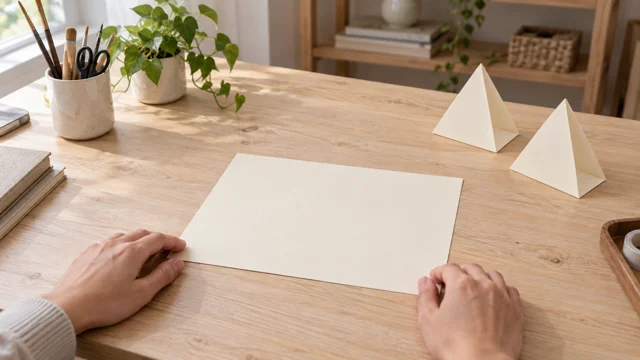
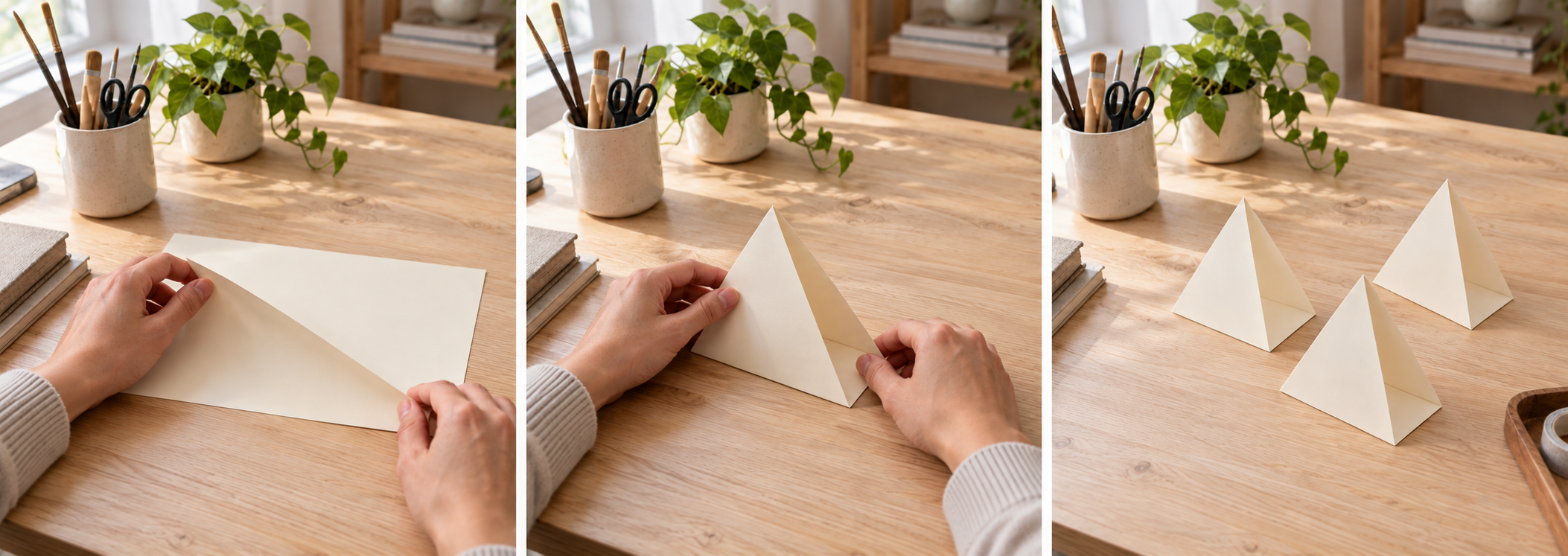
Plan one continuous sequence: start the fold, form the stand, then leave the completed arrangement.
STEP 3Set the generation options
Choose four to thirty seconds, 480p or 720p, and your audio preference. Review the moss image Seedance 2.5 workspace credits after the settings and reference inputs are ready.
- STEP 4
Inspect and refine the take
Watch the moss image Seedance 2.5 result from start to finish, then review its sound and important details. Keep successful decisions and revise one specific problem in the next request.
Features
Let the Action Develop with moss image Seedance 2.5
Use the longer duration range of moss image Seedance 2.5 to show progression, rather than simply prolonging an otherwise finished movement.
Write a sequence of connected changes
For a workshop scene, describe a sheet of paper being positioned, folded, and set beside the finished pieces. Keep the same surface, hands, and lighting throughout the brief. moss image Seedance 2.5 can be directed toward a continuous take in which each action follows the previous one. Establish the purpose of the movement before specifying atmosphere, and avoid asking for several unrelated locations within the same shot.
Give the middle of a moss image Seedance 2.5 clip a purpose
An extended shot needs more than an attractive beginning and ending. Tell moss image Seedance 2.5 what should remain engaging during the middle: a gradual reveal, a changing reflection, or a subject reaching a destination. Allow a short pause after the important event. Review the complete moss image Seedance 2.5 result for wandering motion, sudden substitutions, or an ending that arrives before the action has become understandable.
Assign Reference Roles in moss image Seedance 2.5
Build a reference brief for moss image Seedance 2.5 that distinguishes appearance, movement, and sound instead of presenting an unexplained pile of files.
Assign distinct roles to moss image Seedance 2.5 references
Choose an image for the subject, another for the location, and a video only when its movement contributes to the brief. moss image Seedance 2.5 references should complement each other rather than compete over lighting or clothing. Specify which contribution comes from which input. Ask moss image Seedance 2.5 to use a clip for pacing without importing its background, or a picture for materials without copying its composition.
Keep the collection within useful limits
Reference mode supports up to thirty images, ten videos, and ten audio files, with fifty files total. These are ceilings, not a suggested upload list. moss image Seedance 2.5 audio references must accompany at least one image or video.
Connect Two Compositions with moss image Seedance 2.5
Starting and ending frames give moss image Seedance 2.5 image mode a visible departure point and destination for a planned transition.
Begin with a frame that supports movement
Leave enough room around the subject for the action you describe. A tightly cropped opening can make a wide camera movement difficult to interpret. With moss image Seedance 2.5, use the prompt to explain what changes between frames: an object moving into place, a light revealing a surface, or a camera approaching a display.
Plan a compatible moss image Seedance 2.5 destination
A final picture should agree with the opening about the subject and the scene. Ask moss image Seedance 2.5 for a restrained transition when only the camera position changes; describe an actual transformation when the object changes shape. Matching endpoints do not guarantee a flawless path between them. Inspect the middle of the moss image Seedance 2.5 clip for bending geometry, unexplained additions, and changes to recognizable markings.
Plan the Sound Alongside moss image Seedance 2.5 Motion
The audio option lets moss image Seedance 2.5 accompany the scene with generated sound, while keeping a silent version available when needed.
Specify an audible cause and effect
Describe a sound in relation to an event: paper rustling during a fold, water touching a basin, or footsteps stopping beside a doorway. moss image Seedance 2.5 sound direction is easier to evaluate when it has an obvious visual cause. Give moss image Seedance 2.5 one dominant sound and a quieter background appropriate to the setting.
Listen independently of the picture
After watching the scene, listen again without concentrating on its appearance. A convincing image can distract from an unwanted voice or a poorly timed effect. With moss image Seedance 2.5, treat dialogue as something to inspect, not a promise of verbatim delivery. Turn audio off when you need to build the soundtrack separately, and keep reference audio distinct from a requirement to reproduce a recording exactly.
Review a Complete moss image Seedance 2.5 Take
Choose 480p or 720p for the intended use, then judge moss image Seedance 2.5 on continuity as well as individual frames.
Evaluate the scene before increasing detail
A successful shot needs a readable subject, plausible movement, and an ending that serves the brief. Use moss image Seedance 2.5 to test those decisions before treating resolution as the main creative choice. More output pixels do not repair a missing action. Examine the clip at its intended viewing size, including any planned crop, and leave essential information away from areas an editor may later remove.
Revise one observable failure
Compare the result with the brief and name the smallest useful correction. Ask moss image Seedance 2.5 for a slower approach, a quieter background, or less secondary movement instead of replacing every instruction. Before another moss image Seedance 2.5 request, check the duration, output resolution, audio setting, and workspace credits so the next comparison starts from a known configuration.
Example prompts
Text: a paper craft sequence
One continuous twenty-second shot across a bright paper studio. A pair of adult hands positions a cream sheet, folds it into a simple triangular stand, and places it beside two completed stands. Keep the table, paper color, and daylight consistent. Camera remains at a gentle oblique angle. Quiet paper rustling and room ambience, no dialogue or music. Finish with the hands leaving the arrangement.
Image: a gradual exhibition reveal
Use the supplied first image as the opening composition and the supplied last image as the destination. Over twelve seconds, move gently toward the central sculptural display while preserving the objects, wall texture, and warm side lighting. The display remains stationary. Avoid new visitors, text, or decorative elements. Let the final composition settle briefly. Soft gallery room ambience without speech.
Reference: a coordinated scene brief
@Image1 defines the ceramic vessel and its surface. @Image2 defines the studio setting and color palette. Use @Video1 only as guidance for the slow camera movement, not for its subject or location. Create one fifteen-second shot around the stationary vessel. Keep its base grounded and its silhouette recognizable. Subtle room ambience, no dialogue, captions, or added objects.
User reviews
moss image video creator feedback.
moss image creator reviews

I made a full character PV for my game with moss image MiniMax H3 in one afternoon. The menu UI stayed readable in every frame and the character never went off-model. That used to cost me a contractor and three weeks.

We tested every moss image AI video generator on the market for stylized work. H3 is the only one that held our anime style across cuts. We now use it for pitch reels and animatics on every project.

I uploaded four product photos and got a listing video with music and a voiceover the same day. My click-through rate on the new listings is up 38%. H3 even got the label text on my packaging right.

I ship five vertical videos a week for three brands. moss image MiniMax H3 gets me from brief to draft in under an hour, with sound already synced. My old workflow needed a videographer and two review rounds.

The editing side is what sold me. A client wanted the background of an interview changed — I typed one sentence into moss image MiniMax H3 and the lighting on the subject matched the new scene automatically.

I previsualized my entire short film in moss image MiniMax H3 before we shot a single frame. Rack focus, match cuts, even the title cards — it understands director language, not just keywords.
Moss Image Pricing and Credit Plans
Cancel anytime
Lite
50% off0.025 / credit
Billed $ yearly179· Save $179.8
Video Models



Image Models



- Includes Moss Image SFT and all premium models
- Up to 1 batch generation task
- Standard generation speed
- Standard generation success rate
- Standard customer support
- Commercial Use License
Standard
50% off0.017 / credit
Billed $ yearly299· Save $299.8
Video Models
Image Models
- Includes Moss Image SFT and all premium models
- Up to 4 batch generation tasks
- Priority processing speed
- High generation success rate
- Priority customer support
- Commercial Use License
Pro
50% off0.014 / credit
Billed $ yearly599· Save $599.8
Video Models
Image Models
- Includes Moss Image SFT and all premium models
- Up to 10 batch generation tasks
- Fastest generation speed
- High generation success rate
- Dedicated account manager
- Commercial Use License
Max
50% off0.012 / credit
Billed $ yearly1,199· Save $1,199.8
Video Models
Image Models
- Includes Moss Image SFT and all premium models
- Up to 10 batch generation tasks
- Fastest generation speed
- High generation success rate
- Dedicated account manager
- Commercial Use License
Pay safely and securely with























FAQ
Frequently asked questions
How long can a moss image Seedance 2.5 clip be?
On Moss Image, choose a duration from four to thirty seconds. A longer setting gives the action more time, but the prompt still needs a clear progression. Use only the time required to show the intended event.
Which resolutions does this page support?
moss image Seedance 2.5 offers 480p and 720p in this workspace. Select the output size appropriate to your current task and review the displayed credits. Do not assume that a higher resolution will correct subject changes or unsuccessful motion.
Ca moss image Seedance 2.5 use both a first and last frame?
Yes. Image mode starts from your opening image and accepts an optional ending image. Describe the motion connecting them, and use compatible subjects, lighting, and framing when you want a continuous transition rather than a transformation.
How many reference files can I supply?
moss image Seedance 2.5 reference mode allows up to thirty images, ten video clips, and ten audio clips, with fifty files overall. Upload only relevant inputs. The workspace also checks media requirements beyond the number of files.
Can I generate from audio references alone?
Not in moss image Seedance 2.5 reference mode. Audio references require at least one image or video alongside them. Use a visual input to establish the scene, and explain how the supplied audio should inform the requested result.
Does moss image Seedance 2.5 require generated audio?
No. Use the audio option to choose whether the video includes generated sound. When sound is enabled, describe the desired ambience or events. Review any speech and synchronization before using the result in a finished project.
Where do I check the generation cost?
The moss image Seedance 2.5 workspace displays credits for the selected configuration before submission. Review that quote after changing settings or inputs. This page does not replace the current workspace quote with a fixed per-video price.
CTA
Give moss image Seedance 2.5 a Scene Worth Following
Choose your starting point, describe the progression, and review the credits. Bring a focused brief to moss image Seedance 2.5 on Moss Image, then inspect the full take before selecting it.
Create Your Video